How FoldRemote works
A helper on your Mac streams its screen to iPhone Duo. You pair them once with a code, and after that a tap on the phone is a click on the Mac.
Setup in four steps
Install the helper
Put the FoldRemote helper on your Mac. It runs from the menu bar.
Allow two permissions
macOS asks for Screen Recording and Accessibility. Turn both on in System Settings, under Privacy & Security.
Pair with a code
Open FoldRemote on iPhone Duo and enter the 6‑digit code from the helper’s menu.
Tap your Mac
From then on, open the app and tap your Mac’s name to connect.
Touch on the Mac’s screen
Everything below the toolbar is your Mac. These gestures work anywhere on it.
| Touch | On your Mac |
|---|---|
| Tap | Click |
| Double tap | Double‑click |
| Long press | Right‑click |
| Long press, then drag | Drag, with a magnifier under your finger |
| Two‑finger drag | Scroll |
| Pinch | Zoom the view |
Every button on the toolbar
Blue buttons with ▸ open a second row. Back returns to the main row.
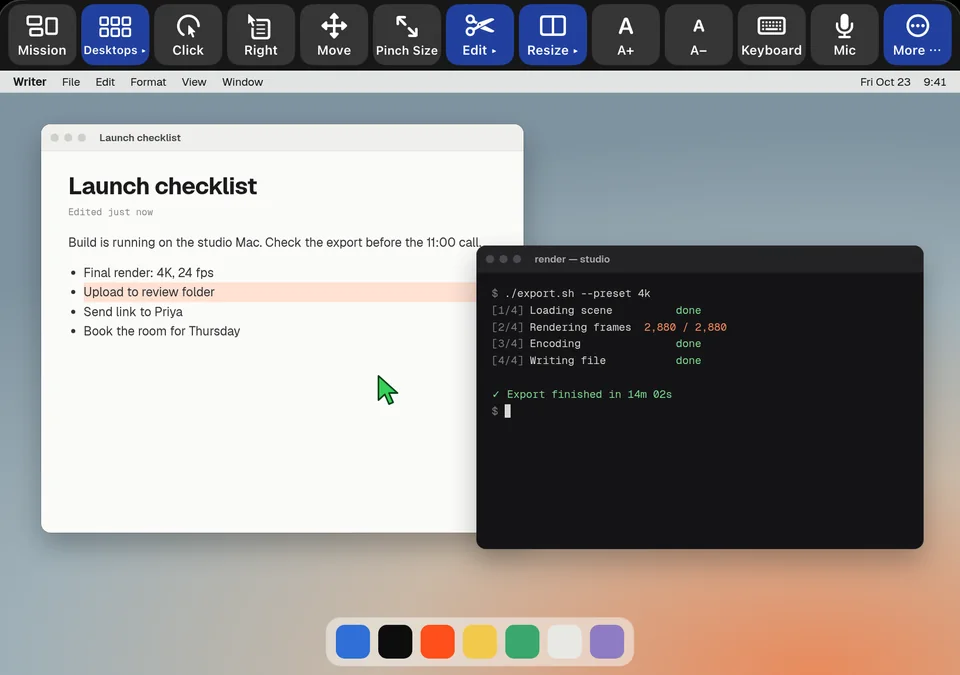
The toolbar is from a FoldRemote development build. The Mac desktop behind it is illustrated.
| Button | What it does |
|---|---|
| Mission | Opens Mission Control. |
| Desktops ▸ | Desktops 1 to 6, previous and next, and Show Desktop. |
| Click / Right | Click or right‑click where the pointer is. |
| Move | Drag the front window around with your finger. |
| Pinch Size | Pinch to resize the front window. |
| Edit ▸ | Select, Copy, Cut, Paste and Undo. |
| Resize ▸ | Left or right half, top or bottom half, quarters, center, full, restore. |
| A+ / A− | Zoom in and out in the front app (cmd = and cmd −). |
| Keyboard | The iOS keyboard with a row of Mac keys above it. |
| Mic | Dictation, typed straight into your Mac. |
| More ⋯ | Disconnect, and the app’s other options. |
What goes over the network
The helper captures your Mac’s main display and sends it to the phone as HEVC or H.264 video. Your taps go back the other way as clicks, drags, scrolls and keystrokes.
At home, the phone finds the helper on your Wi‑Fi.
Keep your Mac switched on and awake while you use FoldRemote. A Mac that’s asleep can’t send its screen.
Get the email on launch day
FoldRemote is coming with iPhone Duo on Oct 23. Sign up and we’ll email you when it’s on the App Store.
Free year for the first 100. The first 100 people who sign up get a free year of FoldRemote.
First 100 signups, counted by email address, one per person. The free year starts when the app launches, and we’ll email you how to claim it.